AdverraBlue Marketing Automation

AdverraBlue Facebook Comment-to-Inbox Auto Reply & Broadcast

Automated marketing for Facebook and LINE OA, including fanpage broadcast, comment-to-Inbox auto reply, and AI tools for online sales teams.

Buying a package creates a new membership. If you already have an account, sign in first so renewal can attach your email automatically.
30+Marketing tools
Auto ReplyComment to Inbox
100,000+People know Adverra
AdverraBlue lifetime offer
AdverraToolChrome extension for broadcast, group posting, post sharing, and data extraction
Comment-to-Inbox system

See the real auto-reply system

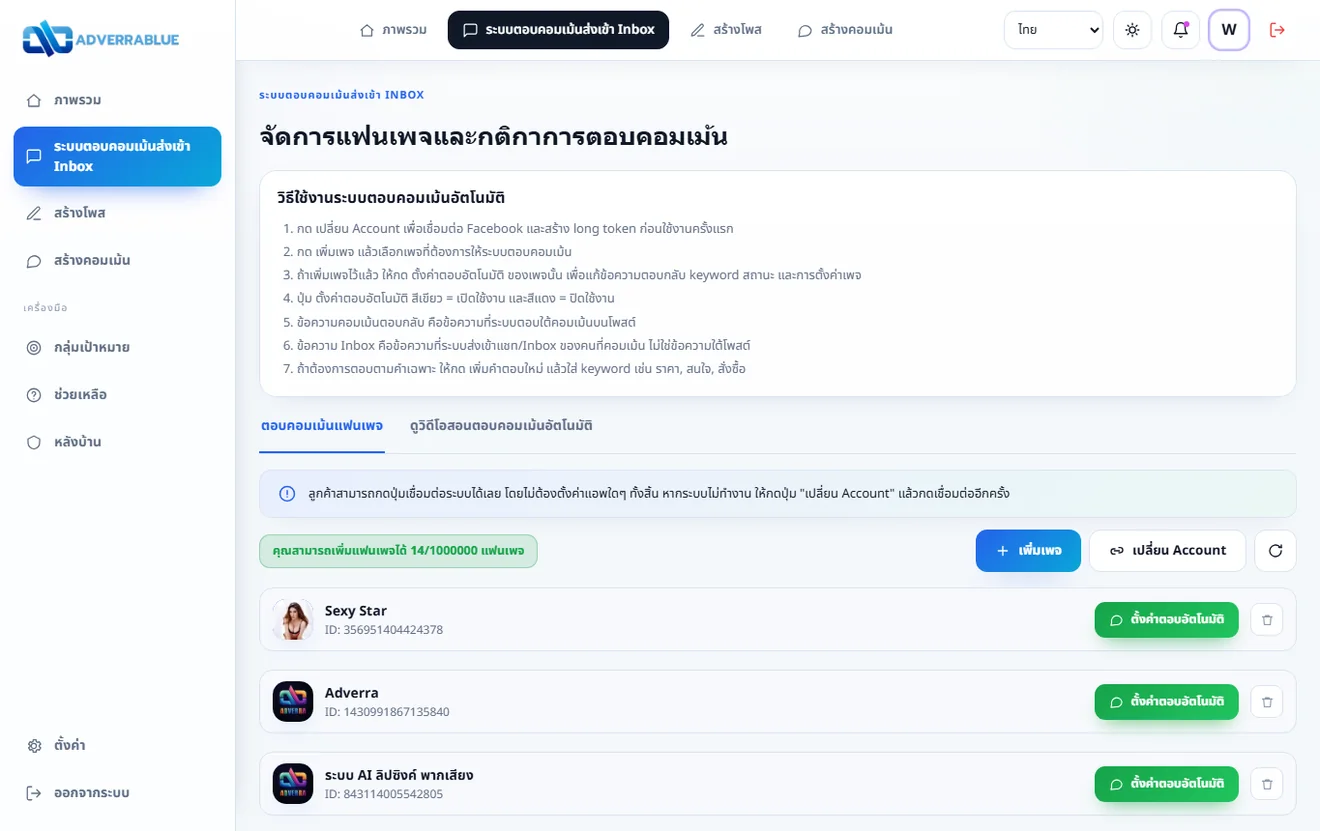
This screenshot is captured from the real apppost.net system so buyers can see the workflow they will use after subscribing.

  • Connect Facebook and create a long token before first use
  • Add fanpages that should reply to comments
  • Set comment replies, Inbox messages, keywords, and on/off status for each page
Screenshot of apppost.net comment-to-Inbox auto reply system

What can the comment-to-Inbox system do?

It helps Facebook pages reply to comments and send Inbox messages automatically, with separate page settings, messages, and conditions.

Connect Facebook and create a long token before first use.
Add multiple fanpages and manage reply settings per page.
Separate public comment replies from private Inbox messages so sales teams are not confused.
Set keyword rules, all-post rules, or selected-post rules using post ID or short caption words.
Attach an image when needed, like comments, hide comments, and prevent unwanted replies with extra conditions.
Turn auto-reply on/off per page, view charts, and use message variables such as {name_reply}.
After subscribing, sign in, connect Facebook, add a page, then open Set up auto-reply for that page.

Why online shops use it

Manage posts, comments, messages, and campaigns in one system. Reduce repeated work and respond faster.

Comment reply to Inbox

Separate public comment replies and private Inbox messages so your sales team is not confused.

Broadcast and share posts

Use with Adverra Facebook Tool for broadcast, group posting, post sharing, and more.

Automation workflow

For shops that need faster replies and cleaner repeated work.

All AdverraTool tools

There are 2 main systems: the web-based comment-to-Inbox system on apppost.net, and the AdverraTool Chrome extension for broadcast, group posting, post sharing, and data extraction.

Comment-to-Inbox web system

Use it through apppost.net for Facebook pages that need automatic public comment replies and private Inbox messages.

  • Connect Facebook and add pages from the website
  • Separate comment reply text from Inbox message text
  • Set keywords, post conditions, and on/off status per page

AdverraTool Chrome extension

Install it on Google Chrome for the full Facebook marketing toolkit, broadcast workflows, and bulk data work.

  • Broadcast fanpage Inbox and LINE OA messages
  • Group posting, post sharing, commenting, and post bumping
  • Extract friends, Inbox, comments, shares, group members, and other data
Free Tool

Useful free tools

Basic Facebook data utilities before running campaigns.

  • View Facebook IDs
  • Cancel friend requests you sent
  • Cancel incoming friend requests
  • Accept friend requests
  • Split data into batches and remove duplicates
  • Spintax Generator
Facebook Tool

Facebook tools for sales teams

Manage fanpages, groups, profiles, Inbox, and campaigns for online selling.

  • Broadcast messages to fanpage Inbox
  • Extract all friend lists
  • Extract customer Inbox data from fanpages
  • Comment on posts or bump posts
  • Add friends by Account ID
  • Delete posts in groups where you are admin
  • Delete posts on profiles and fanpages you administer
  • Extract comments from profiles, groups, and fanpages
  • Extract post-share data from profiles, groups, and fanpages
  • Share posts to groups as fanpage or personal profile
  • Post to groups as fanpage or personal profile
  • Extract joined groups as fanpage or personal profile
  • Search fanpages or groups by keyword
  • Extract group members and people who liked posts
  • Invite post likers to like fanpages and invite friends to groups
  • Extract feed data and more features
LINE OA Tool

Manage LINE OA

Extend from Facebook to LINE OA for customer retention and repeat messaging.

  • Broadcast Inbox LINE OA
  • Add LINE OA Account
System video

Watch before you start

The video helps buyers understand installation and usage before subscribing.

Who it fits and why it is worth it

Key Adverra details summarized so buyers can decide quickly.

Who it fits

  • Online shop owners managing customers themselves
  • Page admins with repeated comment and message work
  • Stores using both Facebook Page and LINE OA
  • Teams that need multiple marketing tools in one place

Why lifetime is worth it

  • Pay once without monthly worries
  • Includes core Facebook and LINE OA tools
  • More auto-reply fanpages than short packages
  • Good for long-term marketing work

Supported devices

The auto comment reply system works on desktop and mobile. The main AdverraBlue Tool runs through a Chrome extension on Windows and Mac computers.

Usage note: The comment-to-Inbox system runs on apppost.net for customer replies. Broadcast, group posting, post sharing, and Facebook/LINE OA tools work with Adverra Facebook Tool according to your package.

Comment auto-reply and broadcast FAQ

Key information before choosing Facebook Page and LINE OA automation.

What is a comment-to-Inbox auto-reply system?

It replies below Facebook Page comments and sends private Inbox messages based on the text, keywords, posts, and conditions configured for each fanpage.

Can I manage comment auto-replies on mobile?

Yes. The apppost.net comment reply system can be configured through a web browser on both desktop and mobile.

What does the broadcast system do?

AdverraTool broadcasts messages to fanpage Inbox and LINE OA and also supports group posting, post sharing, and marketing data workflows.

Are auto reply and broadcast in the same tool?

They are included in the same package but use two interfaces. Comment-to-Inbox runs on apppost.net, while broadcast and Facebook/LINE OA tools run through the AdverraTool Chrome extension.

How do I start using comment auto-reply?

Choose a package, sign in, connect Facebook, add a fanpage, and configure its comment reply, Inbox message, and keyword rules.

Membership packages

Choose the package that matches your workflow. Purchasing is a new AdverraBlue membership.

Easy start

1 Month

300THB

Good for shops that want to start auto comment replies and test real usage.

  • Use for 1 month
  • Broadcast + group posting + post sharing
  • Auto reply for 5 fanpages on desktop and mobile
Subscribe to this package
Best annual value

1 Year

999THB

Pay once for a full year, good for businesses using it every month.

  • Use for 1 year
  • Broadcast + group posting + post sharing
  • Auto reply for 7 fanpages on desktop and mobile
Subscribe to this package
Recommended

Lifetime

2,000THB

Pay once for long-term auto comment reply usage.

  • Lifetime use, one-time payment
  • Fanpage and LINE OA broadcast
  • Auto reply for 10 fanpages on desktop and mobile
  • Manage group posting and post sharing easily
Subscribe to this package
Highest

Super Lifetime

9,999THB

For larger teams, agencies, or users who need the full system unlocked.

  • Unlimited fanpages and devices
  • Full broadcast, auto reply, and post management
  • Good for multiple brands or admins
  • Team usage with high value
Subscribe to this package
Note: If you already have an account, sign in first and renew from the account page so your email is attached automatically.
Need a tax invoice? Contact Line: @adverra before payment so the team can issue the document correctly.

How to buy

Subscribe in a few simple steps.

1

Choose a package

Choose 1 month, 1 year, lifetime, or super lifetime

2

Subscribe

The system sends you to the Adverra order page

3

Pay

Choose a payment method and fill in the details

4

Start using

After payment, sign in with your registered email

Contact Adverra

Ask about packages, tax invoices, or usage every day from 09:00 - 00:00.

Line Official

Ask about usage and the right package for your shop

@adverra

Open Chat

Talk with users, follow updates, and system news

Ask admin

Facebook

Follow news, new features, and promotions

Follow page

Phone

Contact the team directly for urgent questions

080-015-5912

Ready to start automation?

Choose a package or sign in if you already have an account.

View packages again